Thursday, December 8, 2011

First PTAQ meeting and my first public presentation

Last Tuesday I gave a short presentation during first PTAQ meeting. PTAQ (Poznań Testing and Quality) is our local community group for people interested in software testing where we try to present new ideas and share knowledge. First meeting was organized by colleagues from Cognifide. There were more than 40 people, 3 presenters and great venue. We had also hot discussion (about the role of the tester in the future ) which is really promising for future meetings :)

The presentations:
"Knowledge acquisition and sharing for qa team" - Zbigniew Moćkun, Łukasz Morawski (Cognifide)
"Koniec fazy testów. Przyszłość testerów" (Death to testing phase. The Future of testers - my own translation) - Marcin Mierzejewski (Allegro group)
"Jak stawać się lepszym testerem ?" (Becoming a better software tester) - Aleksander Lipski

Thanks for the organizers from Cognifide (Zbyszek and Łukasz) and all attendees. CU on the next PTAQ meeting

Alek

Friday, October 28, 2011

Selenium WebDriver tips 2

1. "Xpath expression cannot be evaluated or does notresult in a WebElement" error

During our recent automation project we've been encountering really irritating error using WebDriver
"The xpath expression '//given xpath' cannot be evaluated or does notresult in a WebElement"

This error was appearing randomly, for example script was working for 10 times but failed on the 11th. Eventually after several experiments we were able to narrow the problem to following factors:

- this problem appears on the IE only(IE8 in our case)
- this problems appears when WebElement is identified using XPath selector
- this problems appears often shortly after webpage is loaded

Possible Solutions:

Get rid of the XPath selectors
This is great idea and Alister Scott presents sound arguments for this here. This approach however is not always applicable in our context. We know that sophisticated XPath selectors can be brittle but having to automate application based on Microsott SharePoint there is not much choice

Add pause before first FindElement (with XPath selector) method
This solution worked out however you need to remember about adding this pause every time new page is opened. Because in general we don't like pauses in our automation scripts for many reasons we were looking for something else.

Update current FindElement method
We found this solution indirectly thanks to Alister Scott and his SpecDriver example on github. Because this problem appears usually at the first attempt to find element using XPath it's easy to update FindElement method and create your own where you can catch the exception for given number of times. An example in C#:

for (int i = 1; i <= 10; i++)
{
try
{
return driver.FindElement(selector);
}
catch (OpenQA.Selenium.WebDriverException e)
{
Console.WriteLine("Error " + i + " raised: " + e.Message);
}

It really works and often above loop doesn't need more than two iteration to return correct WebElement.

2. WebDriver loses focus on IE8

Another issue which appears randomly. Fortunately we were able to identify one of the reason of this issue - Microsoft Office Communicator. In order to run tests using WebDriver on IE (Windows 7, IE8 in our case) Microsoft's IM needs to be switched off if not then WebDriver randomly switches from IE to IM window during script execution.

Alek

Thursday, October 27, 2011

Testing the application displayed in Chinese (中國)

One of the reason I am the software tester is the need to learn something new everyday. For every new project there may be different testing missions, different stakeholders, different technologies - different project context. My latest project was completely different from previous because user names were displayed in local alphabets - eg. Chinese. It was great that I've had the opportunity to learn new alphabet. After couple days I was able to spot some character patterns however I have also realized that I can not see problems in places where I were not looking for. It seemed that it was much easier and faster to test when user names were presented in English. When I complained about this to one of my colleague he suggested to translate those names to more readable format and thanks to this we've found FoxReplace.
"This tool lets you replace text in web pages. You can define a substitution list and apply it automatically or at your own discretion, or make individual substitutions."

Fortunately e-mail addresses of our Chinese users were stored in database using English alphabet, I created substitution list where for each name written with Chinese characters I could assign replacement name based on email login eg. '亞歷山大' -> 'Alexander'.


Thanks to this substitution list I was able to replace all names on the page and easily find (and remember) any user name I was looking for.


Alek

Tuesday, October 25, 2011

Selenium WebDriver tips

Since the beginning of my current automation project we've been encountering issues that seemed to be real showstoppers. These issues were not only time-consuming but could also stop the whole idea of automated checks. Fortunately thanks to the Selenium WebDriver community we were able to handle every problem challenge. Here are some tips that were useful in our context:

1. HTTP Basic Authentication with Selenium WebDriver
Our automated checks needed to be run against web server with HTTP Basic Authentication.

Firefox Authentication Window


IE Authentication Window


Basically the authentication prompt is not available from the Selenium WebDriver. One of the way to handle this limitation is to pass user and password in the url like like below:
http://user:password@example.com

Before we can pass username and password in the url we need to make sure that given web browser let us use this feature.

Firefox
You need to change the following flag:
browser.safebrowsing.malware.enabled

You can change the state of this flag in the default Firefox profile using about:config service page (double click on the flag to change it's state) From now on the Firefox should let you go through http authentication using name and password in the url. (Note that if you are using Selenium WebDriver 2.6 or higher this flag should be disabled by default)

Internet Explorer
Because of the security reason IE by default has this feature disabled. To overcome this limitation you need to update a windows registry as described in this article : http://support.microsoft.com/kb/834489
You need to go to regedit and look for the key

HKEY_LOCAL_MACHINE\Software\Microsoft\Internet Explorer\Main\FeatureControl\FEATURE_HTTP_USERNAME_PASSWORD_DISABLE

Then you need to add a DWORD 'iexplorer.exe' with '0' value in this key:


This functionality should be available immediately after restarting IE browser

In case your authentication server requires username with domain like "domain\user" you need to remember about adding double slash “\\” (or "%5C" symbol in case of IE) to the url you use in Navigate().GoToUrl() function

http://localdomain\\user:password@example.com
http://domain%5Cuser:password@example.com


2. Same Protected Mode across all zones on IE 8
To be able to run WebDriver on IE you need to equalize the Protected Mode settings for all zones in IE8. It's easy when you are in charge of your computer security policy, however it might be difficult when your machine works under global company policy. In that case you may be not able to change this settings even with local administrator rights.


One of the way we found useful is to update these settings through the windows register in following register keys:
HKEY_CURRENT_USER\Software\Microsoft\Windows\CurrentVersion\Internet Settings\Zones
HKEY_LOCAL_MACHINE\Software\Microsoft\Windows\CurrentVersion\Internet Settings\Zones

and equalize values for 0x2500 position in all zones.


Value: 3 (Protected Mode off)
Value: 0 (Protected Mode on)


[UPDATE 1]
It seems there is another way to overcome this IE limitation, however we haven't tried it yet - http://www.qaautomation.net/?p=373

[UPDATE 2]
Above tips were tested on : WebDriver 2.6, Windows 7, Firefox 7, IE8

[UPDATE 3]
Thanks to Damian Galek:

Another way of bypassing Selenium limitation, regarding not being able to reach Windows Authentication prompt, that actually worked for us, could be using SendKeys class (one of the class in System.Windows.Forms.dll library – link). It can be used to type whatever we need into any Windows-based application. So in our solution something similar to thefollowing code was used to enter any desired users credentials and accept authentication prompt:

Driver.SwitchTo().Alert(); #Web driver function
System.Windows.Forms.SendKeys.SendWait("Down}");System.Windows.Forms.SendKeys.SendWait("Down}");System.Windows.Forms.SendKeys.SendWait(username);System.Windows.Forms.SendKeys.SendWait("TAB}");System.Windows.Forms.SendKeys.SendWait(password);System.Windows.Forms.SendKeys.SendWait("{Enter}");Driver.SwitchTo().DefaultContent(); #Web driver function

This may not be the cleanest solution out there but it works.


Alek

Friday, October 21, 2011

"What If..." a new ebook for software testers

Recently I had a pleasure to review an ebook written by Ajay Balamurugadas. This ebook titled "What If..." is the set of tips for Software Testers.
In 22 Chapters Ajay presents his real-life testing experience. This is great book for new testers however more experienced testers should find this ebook interesting too. From this ebook you can learn new techniques, tools and different ways to sharpen testing skills. In addition this ebook presents list of many links to useful websites, blogs and suggests testing books worth to read. I really liked this ebook. Below my first testimonial I had pleasure to write to for this ebook :)
Ajay writes "I wished that someone had warned me beforehand." I can't agree more I wish someone gave me the book of tips about software testing at the beginning of my career or at least taught me to use "what if" question more often. If you aim at skills improvement in software testing and you want to find out the ways you can do this, I strongly recommend this book.


Alek

Tuesday, October 18, 2011

My story with software testing (checking) automation (part 2)

Part 1 of this story.

How to automate ?
Being the student of context-driven school I know that there are no best practice for automation checking. We needed to consider our context before we started to try with any of the available tools or technologies.
Things we tried to take into account :

- Which layer of the application we are able to use for automation?
- Which automation tool will easily handle web application based heavily on AJAX
- What types of web browsers we need to cover?
- Does anyone from the team has some previous experience with automation tool?
- Is our automation going to be a part of CI?
- Are we allowed by company policy to use any open-source tools?
- What are the programming skills among the team.
- Which programming language will be the easiest to learn for new team members?
- Who will be using our automation scripts besides testers and developers?
- How often we have changes in core functionality and UI and what approach and what tools will best deal with such situation?
- Is there possibility to reuse automation scripts or framework for user acceptance/validation part?
- Can we have tools that will let the stakeholder be involved in creating scenarios for automation checking scripts?
- What kind of report we want to deliver at the end of the day?

Thanks to above questions we could easily start looking for things that would best fit our context.

Tools
We started from QTP but this tool was not able to deal with our web application (or we gave up to early). Then we gave a chance to Selenium 1.0 and Watir but we had a problems with automating some sophisticated HTML 5 elements. Eventually we tried Selenium WebDriver and it was it! We were able to manipulate almost all of the application's elements. We could also use C# programming language. In addition Selenium seemed to have a big and active community which is crucial in any open-source project. Selenium WebDriver works also on our required web browsers : Internet Explorer and Firefox. Having the tool selected we could start developing the automation framework.

Approach
We decided to develop the application using Page Object pattern which seemed promising. We liked the idea of separating checks(assertions) from the UI interacting elements. Secondly with Page Objects we could easily split the work among the team members . But most important was the fact that using Page Object pattern in case of UI change we needed to apply the fix just in one place because there was no duplicated code.

Going further
The above approach to automation was great but it was not enough. To crate checks we needed someone who has a basic programming skills. In addition with that framework we were not able to involve stakeholders in user acceptance/validation part. We started to looking for ways to overcome this limitation. We found the Cucumber. Then we went to Specflow which aims for .net projects and the GIVEN-WHEN-THEN story has begun...

Alek

Monday, October 10, 2011

My story with software testing (checking) automation (part 1)

It's started as usual. There is a web based software product with many manual test cases already written. There is a need in project to shorten the regression time for each iteration. There is a few days free where testers wait for the new build. There is a company orientation toward software automation (no matter what, let's automate !). So eventually there must appear someone powerful in project who doesn't know testing at all and suggests to automate manual testing. Keeping in mind that it is very easy to automate some activities on web page (Selenium IDE, QTP recording, etc.) it was a great recipe for automation testing disaster. However this time based on successes and failures of other teams we wanted to start differently and finsish successfully.

Why to automate at all?
We started with this question. What is the reason for automating anything? Can we really automate manual testing? According to great blog post from Micheal Bolton, we should switch labels and use automation "checking" word instead of "testing". But is "checking" word as catchy as "testing" for people who drive the project? It is not and thanks to this new label it was easier for us to explain that what we automate can never be replaced with human "testing". As testers our goal is to provide information about the product. What information we can deliver using automation?

1. We can verify if product being checked automatically is in same shape as it was at the time of automation scripts being written (but only to the extent that the check scripts verify this product).
2. We can reuse the automation scripts on every regression phase
3. We can free testers from repetitive tasks and given the time for real testing.
4. We can use automation to support our manual testing. To check things that are too complicated for human activity or simply too boring for human (read more on Alan Page blog post) It means that we can challenge our previous assumptions about the product and learn new things about the product being tested.

So we decided that we would try to cover with automation some of the regression part. We wanted to have more time for testing and for creating new testing ideas. We also wanted to use automation framework for creating tests that have never been executed before on our software like testing with more types of inputs, with more combinations, with repetitive activities.

What to automate?
Before we started with automation we had already manual regression test cases created. We decided to use them as background for regression automation. Should we really use manul testing for automation? According to one of the lesson from Lesson Learned In Software Testing it can be trap and we should avoid it. But as I mentioned before we wanted to use them as a background only. Based on the manual regression test cases we created a list of things that needed to be obligatory verified during regression. However this list of things to check wasn't our end goal. We needed also to think about the ways of verification some test cases, about the oracles. How we will know that something works or not or better how the machine will know that this works or not. And this discussion leaded us to the tools and question with "how" - how we will do this?.

Saturday, September 24, 2011

New Testing Book: "How to Reduce the Cost of Software Testing"

There is a new testing book recently published : "How to Reduce the Cost of Software Testing".


From the product description :
"Plenty of software testing books tell you how to test well; this one tells you how to do it while decreasing your testing budget."
Having in mind that testing is often first in line to reject in case of budget cut, I see this book valuable not only for testing teams but also for people who drive the software projects. In addition the list of contributors is amazing : Matt Heusser, Michael Larsen, Markus Geartner, Micheal Bolton, Selena Delesie, Jonathan Bach, Scott Barber just to name a few.

Alek

Saturday, September 17, 2011

"Test Design" from AST

"Test Design" is the 3rd course in Black Box Software Testing series provided by Associaton for Software Testing (AST). As you can read in Cem Kaner's recent post this course should be soon available. I have successfully completed BBST Foundation and BBST Bug Advocacy and I think they both were great. I strongly recommend them everyone interested in professional software testing. Looking at the he bibliography and reference list (around 400 books and articles !!) for Test Design I am sure that the course #3 in BBST series will be also so much demanding and valuable. I am looking forward to it.

Alek

Monday, September 12, 2011

Tools for session-based testing

Session-based testing is the structured way of exploratory testing developed by James and Jon Bach. In the article Session-Based Test Management we can read :
"What we call a session is an uninterrupted block of reviewable, chartered test effort. By "chartered," we mean that each session is associated with a mission—what we are testing or what problems we are looking for. By "uninterrupted," we mean no significant interruptions, no email, meetings, chatting or telephone calls. By "reviewable," we mean a report, called a session
sheet, is produced that can be examined by a third-party, such as the test manager, that provides information about what happened"

As mentioned above after each session tester hands a report with important information and results. There is an example of Sample Session Report on James Bach page. The session by design should be uninterrupted which means that things like note taking should be done on fly. It can be easy achieved with applications which support session-based testing.

1. Rapid Reporter, exploratory notetaking

This is tool created by Shmuel Gershon. Rapid Reporter is really small, stays always on top of the screen and doesn't interrupt the testing process. You can type into the app all information worth noted. The types of information like : "Installation", "Bug", "Issue" etc. can be tailored to the individual needs. In addition you can easily assign time range for the session.


What is really cool is the possibility of doing screenshot with just one click, moreover this screenshot will be printed next to the inserted comment in a session report.


After the session the app generates session report with all entered information along with screenshot taken during the session. The report can be presented in e.g. HTML format

2. Session Tester

This is tool created by Jonathan Kohl. Before the session you need specify: Tester Name, Mission, Session Length.


Once you start your own session Session Tester window is opened. You can type there all information learned during the session. This app stays also in tray and thanks to this you can get information in form of the balloons about time left. You can also find in this app some nice little feature called "Prime Me". When you click the button you get some random inspiring notes which may help you during the session. e.g.:
- Consider self-reference.
- What are the boundaries?
- Try something negative.
- Testability first.
- Who's your client?
- What's the language?
- Consider the opposite.
- Unless...
etc.

The results of the sessions are initially saved to the xml files but there is also an option to produce session report in formatted HTML file.


3. Atlassian Bonfire
I haven't had chance to work with Bonfire yet but if a picture is worth a thousand words, a video must be worth a million :)


Alek

Saturday, September 10, 2011

Numberz Challenge - my approach

Recently Alan Page has posted testing challenge on his private blog - Numberz Challenge. He has attached little application and described it in this way:
"When you press the "Roll!" button, the app generates 5 random numbers between 0 & 9 (inclusive), and sums the numbers in the "Total" above. The stakeholder’s primary objectives are that the numbers are random, and that the summing function is correct."

And here was the challange :

"If you want to play a little game for me and do some testing, test this app and tell me if it’s ready to ship (according to the stakeholder expectations)."


My approach to this challenge:

Learn as much as possible about the stakeholders and application context.

- Are there any other requirements beside those written down?
- What are the important information we need to know prior to testing ?
- Who is the customer ?
- Where this application is going to be used ?
- What are the consequences of shipping defective product ?
- What time is given to test this product ?
- Is this standalone product, or maybe just an part of something bigger ?
- On what OS and hardware this app is going to be used ?
- How long this app is intended to run without restart ?

Test against written requirements.

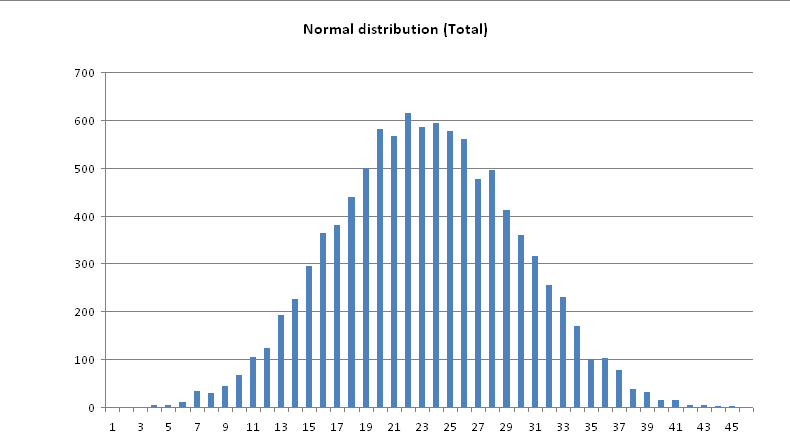
I clicked the "Roll!" button couple times and I could verify that application generates 5 numbers (0-9 inclusive), that numbers seemed to be randomly generated, that total were calculated correctly. This simple sampling however was not enough. To verify randomness you need way more tests. I was also curious if "Total" is always calculated correctly. To have more samples I hired automation tool. I have started with AutoIt and it worked out perfectly. I could process 10k rolls in about 60 seconds. Because I had pure blackbox approach I didn't know if restarting application might impact the results. So I decided to rolls numbers in 2 way :
- 20.000 times in a row without restarting the application
- 20.000 times but after each 1000 rolls I restart the application.

Based on the new results I've created normal distribution chart for the total.


Here we can spot some deviations from normal distribution e.g. the '20' shouldn't appear more often then '21'. Then I tried to focus on generated numbers to see if all numbers appear equally.


Number 3 has about 13% chance for appearing whereas it should has around 10%. It was first possible bug. I also noticed that for 20k rolls the Total has been 400 times calculated incorrectly which could be another possible bug.

Test against non-written requirements

The application had some problems with closing and I've encountered this on Windows 7 and XP OS. I was trying to observe the memory usage after 50k of rolls and without restarting the application for 24 hours but there wasn't any significant change in memory usage.

Ship / No Ship

Based on the information I learned from Alan about the app and it's context I come up with following conclusion.

Hard to say really when keeping in mind that shipping decision is always business decision. All in all we know that this app doesn’t meet all stakeholder expectation because numbers are not random and total doesn’t always work correctly. On the other hand there will be around 50 rolls per year per car dealer where randomness deviation may be not easily spotted. In addition statistically there may be one bad sum calculation a year (2% * 50). Is this acceptable ? I don’t know but for sure doesn’t meet given requirements.


Here you can read the summary post from Alan : Numberz Winnerz

Alek

Friday, September 9, 2011

Questioning Simple Test

This is the 2nd post about the testing challenge that was given to my testing team during one of the internal testing workshop. The presenter was trying show us how often requirements are misunderstood even by technical people which often leads to making false assumptions.

Major of attendees suggested to turn 1) card #1 (card with 'A' vowel letter on one side) expecting even number on the other side and 2) card #3 (card with '4' even number on one side) expecting vowel on the other side. That was a trap. We can't say based on given requirements that if there is even number on one side there must vowel on the other side. It works only other way around: if there is vowel then there must be even number. It was pure false assumption.
According to presenter we should turn 1) card #1 (with 'A' vowel letter on one side) to verify if there is an even number on the other side as a positive test and 2) card#4 (with '7' odd number on one side) expecting consonant letter only on other side as negative test. This challenge however was not as easy at seemed because you can spot more false assumption in it.

First of all I think there is problem with statement: "Can you optimize testing and have only two cards that you might turn to test and verify that your system works correctly."
We can never ever be 100% sure that something works correctly when it comes to testing software application. And in this exercise according to presenter 2 simple tests were enough to prove that this system works! It's like with testing calculator summing function, when you put '2+2' and you get '4' which is correct but you can never be sure if this '4' was the result of summing function or maybe hardcoded result value for each operation.
Secondly let's focus on this requirement : "system returns playing cards with numbers or characters on both sides". English is not my mother language and maybe that is the problem but based on above statement I can't assume that for each card I will have letter on side and number on other side. I think that "letter or numbers on both sites" suggest that we can also have cards with only letters and only numbers on both sides.

Alek

Friday, July 15, 2011

Simple Test

Imagine a system which returns playing cards with numbers or characters on both sides.
There is one requirement:
If there is a vowel on on side, there must be an even number on the other side
System returned four cards like:


Can you optimize testing and have only two cards that you might turn to test and verify that your system works correctly.

Which cards would you turn ?

Alek

Monday, July 4, 2011

Matura exam and subject for bias

In Poland every year in May 350.000 students take Matura exam (High School Diploma examinations). Below is a chart with points distribution from Matura exam in Polish on foundation level in 2010


Do you see anything interesting in the picture above?

Almost all values fit into normal distribution, however for some values results seem not correct - values between 17-22 points. Actually results doesn't seem strange when you know that to succeed in this exam student needed to have 30% of maximal number of points which in this case equaled to 21 points. According to this chart it looks that people evaluating this exams had tendency to omit giving exactly 20 points. There may be many reasons for such tendency. We don't know if this was done consciously and on purpose. What we do know is that people who are expected to make any evaluation can be easily directed toward some direction because decisions are subject to bias. I've learned during AST Bug Advocacy course that in decision making we can analyze several biasing variables. For example common bias variables are : "Motivation", "Expected Consequences" , "Perceived probability" ,"Perceived importance of the task". We don't know if there were any consequences for examiners for failing student when he got exactly 20 points, but for sure this number had some impact on making pass / fail decision.

The Matura exam in Polish consist of foundation part and second not mandatory part on advance level. This part has no impact on pass / fail decision. Let's see normal distribution of points on advanced level.

There is no strange values around specific numbers. So it looks that with pre-defined boundary point for pass / fail decision, examiners are less likely to fail students which have one or two points below this boundary value.

Same applies to people who evaluate software on daily basis - testers. Our decision regarding Bug / Feature is also subject to bias. Glen Myers in his book "The Art of software Testing" writes that "testers who want to find bugs are more likely to notice program misbehavior then people who want to verify that the program works correctly". What is most interesting testers do this unconsciously.

You can read more about above phenomenon by searching phrase Experimenter Effect and for more about making decision under uncertainty search Signal Detection Theory

Alek

Sunday, June 19, 2011

I hate manual testing!

Every now and then when you sit among testers you can hear:
"I hate manual testing !"
I tried once to follow this sentence and asked additional questions:
"What do you specifically hate in manual testing ?"
I received following answers:
"I hate doing repetitive tasks!"
"I hate regression tests !"
"I hate writing test scripts for someone else!"
"I hate following someone else’s test script!"
"I don't want to just click around this like a monkey!”

I replied: "What you would like to have instead?"
"I would like to automate something, I would like to do automation testing!"
It's obvious that regression part of testing is best candidate for automation because people are often inefficient with doing repetitive tasks.
What about preparing test scripts in advance or following test script created by someone else? I think that with: creating test scripts from requirements, writing test scripts without seeing product to test, executing test scripts without possibility to do own research, the testing is simply disappearing. The problem is not in manual testing itself but in treating testing like linear office activity whereas in my opinion testing should go beyond verifying what is to what is expected. Secondly why not take advantage from people having "testing DNA" instead of treating them like clicking monkeys ?

Below is the definition of exploratory testing from Cem Kaner’s blog
"Exploratory software testing is a style of software testing that emphasizes the personal freedom and responsibility of the individual tester to continually optimize the value of her work by treating test-related learning, test design, test execution, and test result interpretation as mutually supportive activities that run in parallel throughout the project."
I think that with above approach to testing we wouldn't hear often "I hate manual testing!” Do you agree?

Alek

Saturday, June 4, 2011

Tester and challanges

One of the common question you can hear during job interview for tester role is : why do you want to work as a Tester ? I can see in this question great opportunity to say about passion for testing, to mention about value tester can create and of course it's chance to mention something about solving problems and challenges.

Since I remember I always liked puzzles. It was sometime after I had started my first job as tester when I realized that this kind work doesn’t need to be necessarily boring and I can have a lot fun from it. When you work as tester you often encounter situation where you touch something new that you have never seen before: new system developed in new technology which works in new business environment and you have to collaborate with different stakeholders.
To create value with your testing you need learn quick and this is often great challenge. Of course tester work doesn't always look like this, depending on context you are sometimes obligated to work for same project for long period, to do repetitive task, to create tones of documents and to create evidence for every single piece of test activity. In such situation there is great opportunity to stay in shape as tester and have some fun from testing - it's Weekend Testing movement. These challenges occur usually during weekends. For those who hasn’t had chance to participate there is a place where some of the weekend’s challenges are archived

You can also create challenges by yourself, simply by challenging your thoughts with colleagues, by working on imaginary problem and ways to tackle it, you can try reverse engineering on some web application. There is a lot of ways to keep your Testing DNA in good shape. Good Luck!

Alek

Thursday, May 26, 2011

Important skill for an exploratory tester

One of the ways to learn something new or make improvement being a tester is to be challenged by someone more experienced. I've first time experienced such a "way of learning" during coaching session with James Bach. This time the challenge came from Michael Bolton.
"Micheal: One KEY skill for an exploratory tester is to find out what the requirements REALLY are. What ARE the ways of finding out? In general, what are the sources of information on a project?"

I started with the question. What do you mean by requirement?

"Micheal: A requirement is /what someone important wants/ as a part of the completed product.
Notice that /what someone wants/ is not necessarily written down. A requirement is not a piece of paper, or something written on one. The paper and the writing are /representations/, literally re-presentations, of /ideas/."


The above idea has really opened my eyes. How often we rely on written documents only treating them as the one and only one oracle. It's hard even for technical people to articulate what they really want. Now imagine that you need to describe a thing that you haven't seen before. It's hard to put everything on paper and easy to miss something that may become important on the end. It's good to keep in my mind that what we read in formal document is the re-presentation of client idea only. And now question, how often have you aimed with your tests to cover the specification only (assuming that your test mission is for something more than specification coverage) ?

I started answering to challenge with following ideas: people, stakeholders, previous bugs, written specification, developers know-how, service desk and their database of incidents, regulations (eg. FDA), previous versions/products, meetings with clients/stakeholders

Michael cataloged my ideas into:

/References/-> things that we can point to. The reference allows you to say, "It says here..." or "It looks like this..." (previous bug reports, specifications, regulations, previous version of the products)

/Conference/ -> Information obtained by /conference/ - interaction with other people. (people, stakeholders, programmers' know-how, meetings with clients)

/Experience/ -> The program provides with information via /experience/, the actual empirical interaction with the product.

/Inference/->. When you reason about information that you have, extend ideas, weigh competing ideas and figure out what they mean or what they might suggest, that's information from /inference/.

Micheal summed up the challenge with following:

"Michael: When we think about exploring, we think about identifying and developing the information we have. That's a key part of the *learning* mission of exploratory testing."


The coaching session was great. This session was exacting and bring a fun at the same time. Thanks to this session I realized that I need to improve identifying and developing information that I already have. Going beyond what is written in formal document should give me broader perspective and help in creating better tests in the future.


Alek

Tuesday, May 17, 2011

FDA, Explorotary Testing and Michael Bolton

One of the abbreviations I've learned during a project for one of my clients was "FDA".
FDA ( Food and Drug Administration) is an agency within the Department of Health and Human Services which is responsible for protecting the public health in USA. The project I was involved was strongly "validated" and had to be compliant with FDA regulations (21 CFR Part 11 - Electronic Records and Electronic Signatures).

How these affect testing?
Every single piece of test (usually test script) had to be formally reviewed and signed before and after execution by 3 persons. In total 6 signatures per each test script. My first feeling was that this project is really good tested. But soon I have realized several problems. This huge bureaucracy introduced many consequences for example very long loop between test idea (the moment of creating the script) and test execution (the moment when formally written test step were used for "testing").
Furthermore testers responsible for test scripts creation where seldom executing own test scripts. This approach was compliant with General Principles of Software Validation and guidance for Electronic Signatures Validation provided by FDA. But from my point with such enormous obligatory bureaucracy something which supposed to be "testing" becomes "checking" and regular office work. This 'heavy scripted testing' highlighted the problem of separation between the test creation and execution. Even though we’ve covered all written requirements with test scripts we didn’t go beyond this, we didn’t find out new informations about the product, we didn’t present more insights to stakeholders, we didn't use diversity of tester experiences and skills - simply we were not serving the project as we could do. In addition with huge amount of resources we were still struggling to meet deadlines, leaving people exhausted and unhappy.

Below simple example:
Imagine that there are two testers. Tester A covers requirement with 2 test scripts. One test script per positive and negative test case. Tester B executes those two test scripts. Execution occurs usually month from the moment of test script creation. What are the results of such approach? For example you will never hear statements like:

"Wait, let’s do this test first instead of that test" or
"Hey, I wonder what would happen if…", or
"Bag it, let’s just play around for a while"*


There was simply lack of exploratory testing. For every suggestion of change I heard we have to follow FDA rules and keep "scripting" requirements. This made me wonder, how on earth some government agency can know better than our company what is best for testing ? I went with this problem to Michael Bolton. I was lucky and he found a minute to discuss this with me:
What I learned from this coaching session:

1. There is no procedure and script for producing test scripts.
It means that to some extent, we all apply exploratory approach. When we create any test script we often combine our subjective knowledge about the program, our previous testing experience, and formal requirements. Rarely same approach works for each test script and we need to make decision what is best along the way which can be the argument the every scripted processes "come from" exploratory processes, and not the other way around. Michael also pointed out that "whatever benefit the script provides after you've done your exploration the real benefit came when you found problems "during" the exploration" and I agree with this. From my experience I can say that often more problem are found during test script creation ("exploration") than while actual test script execution

2. There is no single statement in FDA guidance that we have to apply scripted testing to achieve validation and verification.
I have reviewed FDA guidance and regulations and indeed I couldn’t find a word that test scripts are the must. They mention about the evidences, which can be gathered with any approach to testing.
He also suggested to read the principle of the least burdensome approach. This document is not directly related to testing but we can read there few interesting statements for example :
"(...) FDA is an agency committed to fostering innovation and ensuring timely public access to beneficial new products. A least burdensome approach should be used in almost all regulatory activities. Application of the least burdensome principles to premarket requirements will help to reduce regulatory burden and save Agency and industry resources (...)"

I see above as suggestion for well-balanced approach in every aspect of project validated under FDA regulations. For example: why can't we be more flexible, let’s have enough evidences of executed scripted tests while on the other hand give testers freedom to explore the product so they can use their experience and unique testing mind in best possible way.

3. What can we change ?
- Think in terms of reference, inference, conference, and experience. Think in terms of keeping the design activities closely linked to execution. Instead of telling people what steps to follow, provide them with a motivation or a risk or an information mission.

- For the less experienced or less skillful testers, supervise them and coach them. Train them.

- Now, when there are specific things that need to be checked, specific procedures that MUST be followed - specify those.

- Provide them with guidewords for the sorts of problems that you want them to focus on.

- Another thing to get them to do: keep notes of your observations, questions, concerns, confusions. Talk about them after the testing session, or get help during it.

- If someone wants to know /exactly/ what you did, consider this: screen recorder (eg. http://www.bbsoftware.co.uk/BBTestAssistant.aspx )


Alek

*(I borrowed above quotes from Micahel Bolton)

Saturday, April 30, 2011

Thinking like a tester and lateral thinking

There is a common belief that testers are "negative" thinkers, that testers complain, that testers like to break stuff, that testers take a special thrill in delivering bad news. While reading "Thinking Like a Tester" chapter from Lesson Learned in Software Testing book we can realize that there is an alternative view. For example: Tester don’t like to break things -> they like to dispel the illusion that things work.
With every lesson form this chapter we learn how tester can develop their mind and how different thinking can help to become better testers. One of the lesson is:

Lesson 21. Good testers thinks technically, creatively, critically and practically

According to authors all kinds of thinking fit into testing. They consider however 4 major categories of thinking as worth to highlight:
Technical thinking - the ability to model technology and understand cases and effects
Creative thinking - the ability to generate ideas and possibilities
Critical thinking - the ability to evaluate ideas and make inferences
Practical thinking- the ability to put ideas into practice

This lesson reminds me that there is another way of thinking which is not a new category but for sure worth to mention in this context - Lateral Thinking. I've read about this term for the first time in one of the book by Edward de Bono : "The Use of Lateral Thinking".
According to Edward de Bono":
Lateral thinking is solving problems through an indirect and creative approach, using reasoning that is not immediately obvious and involving ideas that may not be obtainable by using only traditional step-by-step logic.

We can read in this book that lateral thinking is not always related to solving problems but also helps to find new way of perception of old things and to generate new ideas. De Bono also illustrate lateral thinking in following way :
"You cannot dig a hole in a different place by digging the same hole deeper"

I think it relates very much to testing. Sometimes doing more tests in same way or in the same place is not giving us any new information. To learn something new we have to change direction.

In this book we can also read that people get used to one way of thinking. It reminds me that very often when I see something new (eg. software) my first way of using or running it becomes immediately a new habit - one and the only way of using it. I am limiting myself and forget that this way of using that thing (eg. program) is just one from many. Using lateral thinking may help us in such situations. Applying lateral thinking remind us that we should not be accustomed to the only one way of doing something only because it worked out for the first time.

Alek

Tuesday, April 26, 2011

Book Review: Lesson Learned in Software Testing

I heard about this book so many times, but thanks to company library it has finally slipped to my hands :)

Lesson Learned in software Testing
A Context-Drive approach
by
Cem Kaner
James Bach
Brat Pettichord

Inspired by Michael Larsen and his book reviews, I decided to write my own book review. I think it will help me with better understanding of this book and also push me to think about it’s content for longer than couple of seconds.

This book consists of advices not only for people in Testing Field but for all who are working around Software Testing and Software Quality.

Chapter 1. The Role of the Tester

Do you agree with below statements ?

- Testers assure the quality
- Testers should be able to block the release
- We have bug-free product
- The product can be tested completely
- Tester should be focused on requirements only
- Programmers are on the opposite site for testers

If you agree with any of above I strongly recommend reading this chapter to see different point of view. Authors present their opinion about many misconceptions regarding role of tester and testing. It's worth to read their arguments and attached examples.
Below couple lessons from this chapter with my own explenation:

"You are headlight of the project"
We don’t drive the project, we don’t make decisions, we are in project to find information about the product and present these information to every stakeholder who is interested in it so they can make better decisions.


"You will not find all bugs"
Authors present their opinion that it is impossible to find all bugs in a product unless your product is very simple or you have limited imagination. During my career I heard sometimes "bug-free software" which simply presents same misconception. We would have "bug-free software" if all the existing bugs were found but we don't have because it's impossible to check every possible place in the product with every possible combination of different circumstances. Even if we have enough resources to achieve this we should still remember the what is feature for someone can be bug for someone else. I like the example which comes from AST BA exam question:

"Suppose we revised a program so that it looked up all display text (e.g. menu names) from a text file on disk, so the user could change the language of the program at any time (e.g. French menu text to Chinese). Suppose too that, because of this change, the new version is much slower than the last, making some people unhappy with it. How we would evaluate this. Is it bug or feature ?"


"Mission drives everything we do"
Having in mind that completely testing is impossible, we should have clear mission on what we are going to achieve with testing. Some example test missions from book :

"Find important bugs fast"
"Prove a general assessment of the quality of the product"
"Do whatever is necessary to satisfy particulate client"


The mission may change from place to place, from context to context and from project to project but still we should have clear guidance for our testing activity.

Alek

P.S.
The initial plan was to create review for each chapter, however I think it's not good idea. The book is packed with so many tips, suggestions and insights that I think that each lesson is worth to review separately. Instead of reviewing all chapters I will try to focus on some of the lessons in later posts